How to use Character Pin — consistent characters across every scene
Character Pin lets you train a specific character — a brand mascot, a recurring illustrated figure, or a persona — and keep them consistent across unlimited scenes, poses, expressions, and contexts. This guide explains how to set it up.
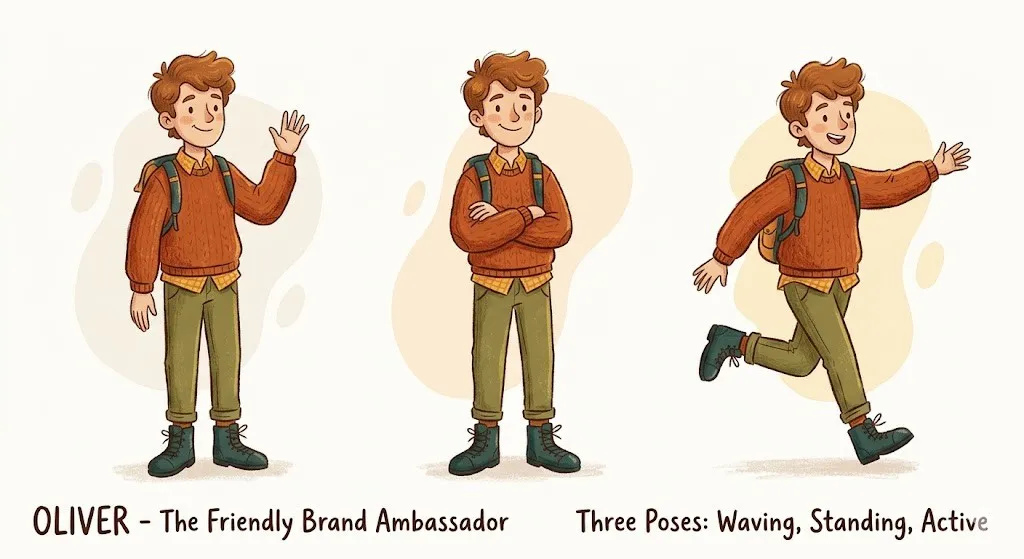
What Character Pin is for
Maintaining character consistency is one of the hardest challenges in AI-generated illustration. Without Character Pin, the same character looks subtly different in every generation — slightly different proportions, different facial features, different details. This makes it impossible to build a campaign series, a brand mascot library, or any narrative visual content where the same character needs to appear repeatedly.
Character Pin use cases: — Brand mascot content production at scale — Campaign series featuring a recurring character — Illustrated storyboards and narrative sequences — Social content built around a brand persona — Children's brand and education content — Game and entertainment character development
How to create a Character Pin
Open your Workspace and navigate to the Pins section
Click New Pin and select Character Pin
Upload 5 to 10 images of your character — ideally showing different poses, expressions, and angles
Give your Character Pin a name
Click Create Pin — your character is now trained and ready to be placed into generations
How to generate with Character Pin
Open the generation studio
Write your scene prompt describing the context, environment, and action you want the character to appear in
In the Pins panel, select your Character Pin
Click Generate
Mianki AI will generate four variations of the scene featuring your character, maintaining their visual identity — face, proportions, colour, and distinctive details — across all variations.
Tips for better Character Pin results
Upload multiple angles Include images of your character from the front, three-quarter view, and side profile if possible. The more angles the model has to learn from, the more accurately it will maintain the character in unfamiliar poses.
Include a range of expressions If your character has a range of expressions, upload examples of each. This gives the model the vocabulary to interpret emotional direction in your scene prompts accurately.
Be explicit about action and pose in your prompt Tell the model exactly what you want the character to be doing. "Standing with arms crossed, confident expression, looking directly at the viewer" will produce a more accurate result than "standing in a scene

